MIDI clock
Hardware sequencers that follow a DAW's MIDI clock often drift, wobble or flam against the track, because the clock arrives unevenly. Pocket fixes that. It sends steady clock to your drum machines, sequencers and synths so they lock to your session, and it can give them the swing and feel of classic hardware too.
Coming soon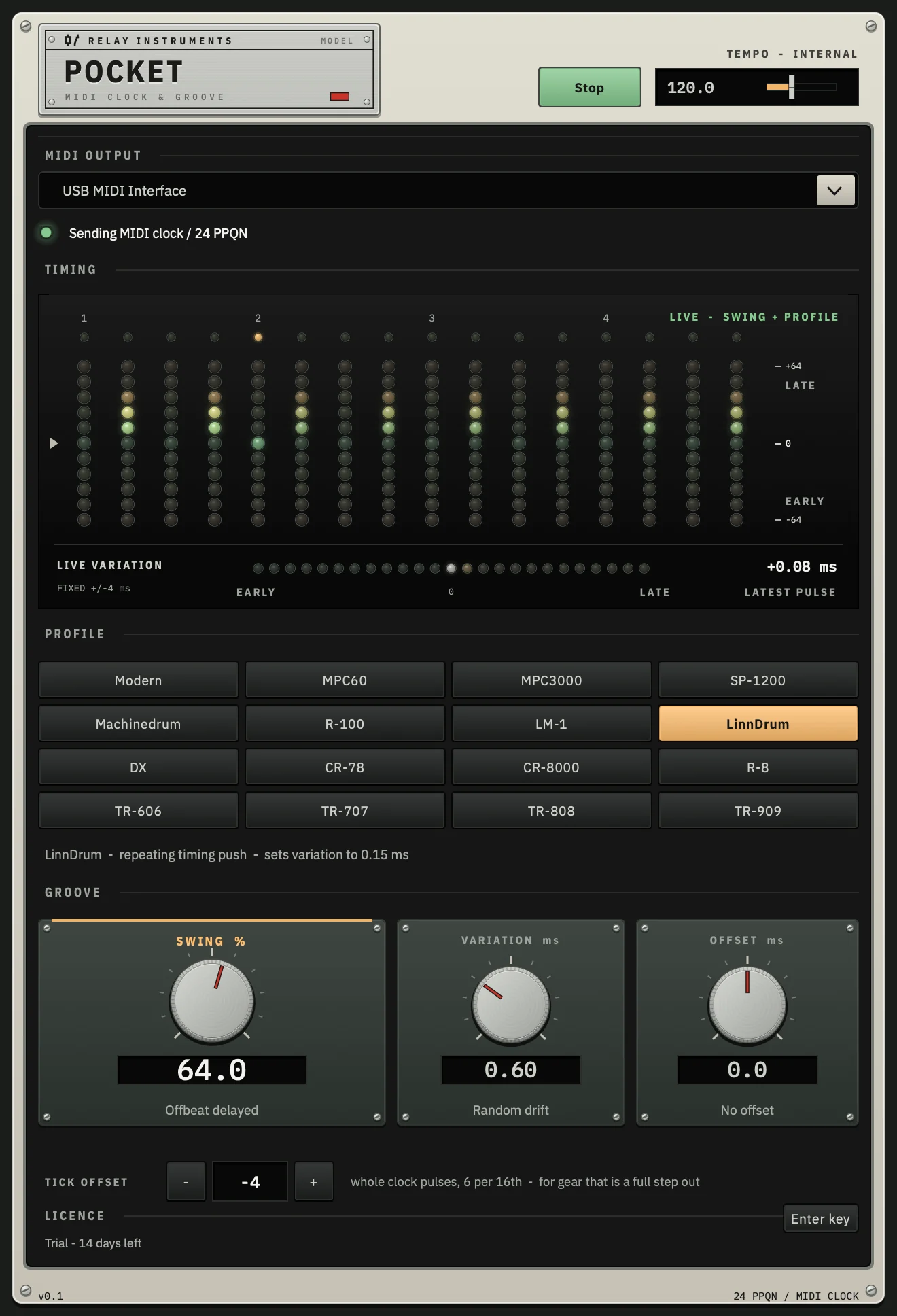
What it does
-
Steady clock, not DAW clock
Pocket times every clock pulse on its own high-priority thread and sends it straight to the MIDI port you choose, instead of leaving it to your DAW's clock output. Your gear stops drifting and wobbling against the track.
-
Swing
Delay or push the offbeat sixteenths, and your hardware sequencers swing along with the track.
-
Sixteen groove profiles
Timing feels modelled on classic drum machines, samplers and sequencers, built from published timing measurements of the original hardware.
-
Variation
Optional human-scale drift and flutter, the small instabilities real machines passed on to the gear they drove. The same settings always reproduce the same feel.
-
Offset
Move the clock earlier or later in milliseconds to line up gear with latency, or by whole clock pulses for gear that sits a step out.
-
See the timing
A lamp display shows where every sixteenth lands, early or late, and a second strip shows the live variation as it plays.
Specifications
| Formats | Audio Unit, VST3 and a standalone app |
|---|---|
| System | macOS 10.13 or later, Apple silicon and Intel (universal). Mac only for now: there is no Windows or Linux version |
| Sync | Follows your DAW's transport and tempo; the standalone app has its own tempo and start/stop |
| Output | MIDI clock (24 PPQN) with start and stop, to any CoreMIDI port |
| Trial | 14 days, fully featured, no account needed |
| Availability | Coming soon |